We built our own product this way first.
Awnitboss (formerly Eidice) answers leads for real estate agents and keeps the conversation going. AI agents built it, inside a system we designed. Here is how we would work with you, what the product does and how it gets built.
How we would work with you.
You bring how your business runs today. You do not need an AI strategy, and you do not need to know what you want built.
A free first call
You show us the work and the tools it touches. A screen share is enough, and we need no account access to start.
One clear recommendation
We tell you the one thing worth fixing first and what it would take. If a setting in a tool you already own solves it, we say so. If AI is not the answer, we say that too.
One clear quote
You see what is included, what your team contributes and what it costs to build and keep running. Nothing starts until you say yes.
We build it and stay on
We connect it to your tools, train the people doing the work and include the first month of support. You decide what runs by itself, and you can stop it at any time.
It takes less time than most companies expect, because AI agents do much of the building, and it is priced to match.
Why you can trust the work.
We held our own product to this standard first. Oliver Labs LLC built Awnitboss to do the communicating for real estate agents, and every lesson along the way became a rule our AI agents have to follow. Those rules are the system on this page.
Oliver Labs LLC provides the software. Each agent's business remains the sender of its messages.
On your project, the same system applies. We start from how your work actually runs, decide what AI should and should not do, and answer for the result.
One lead, start to finish.
Awnitboss is a CRM for real estate agents that does the communicating for them. Here is what happens when someone reaches out.
A lead reaches out
From Zillow, the agent’s website, an open house sign-in or the inbox. Every lead lands in one place.
Awnitboss answers, in the agent’s style
It writes from what the person actually said, about the home they asked about. It sends from the agent’s own address, so the lead’s next reply comes straight back to the agent’s inbox.
It keeps the conversation going
Most leads are not ready the day they reach out. A follow-up plan keeps in touch for as long as it takes, each message written for that person, and it stops the moment they reply.
It notices what matters
When a lead mentions a birthday, a move or a closing date, it spots it and asks the agent once what to do with it.
The agent steps in when it counts
When someone wants to see a home or talk price, the conversation comes straight to the agent, with the lead’s whole file one tap away.
We are not here to sell you a CRM.
Awnitboss shows what this looks like when it runs. In your business the lead might be a customer request, an invoice or a new job. The pattern stays the same: the routine work runs on its own under rules you set, and a person steps in when it counts.
The product.
Awnitboss answers new leads, keeps follow-up going and writes replies in each user’s style.
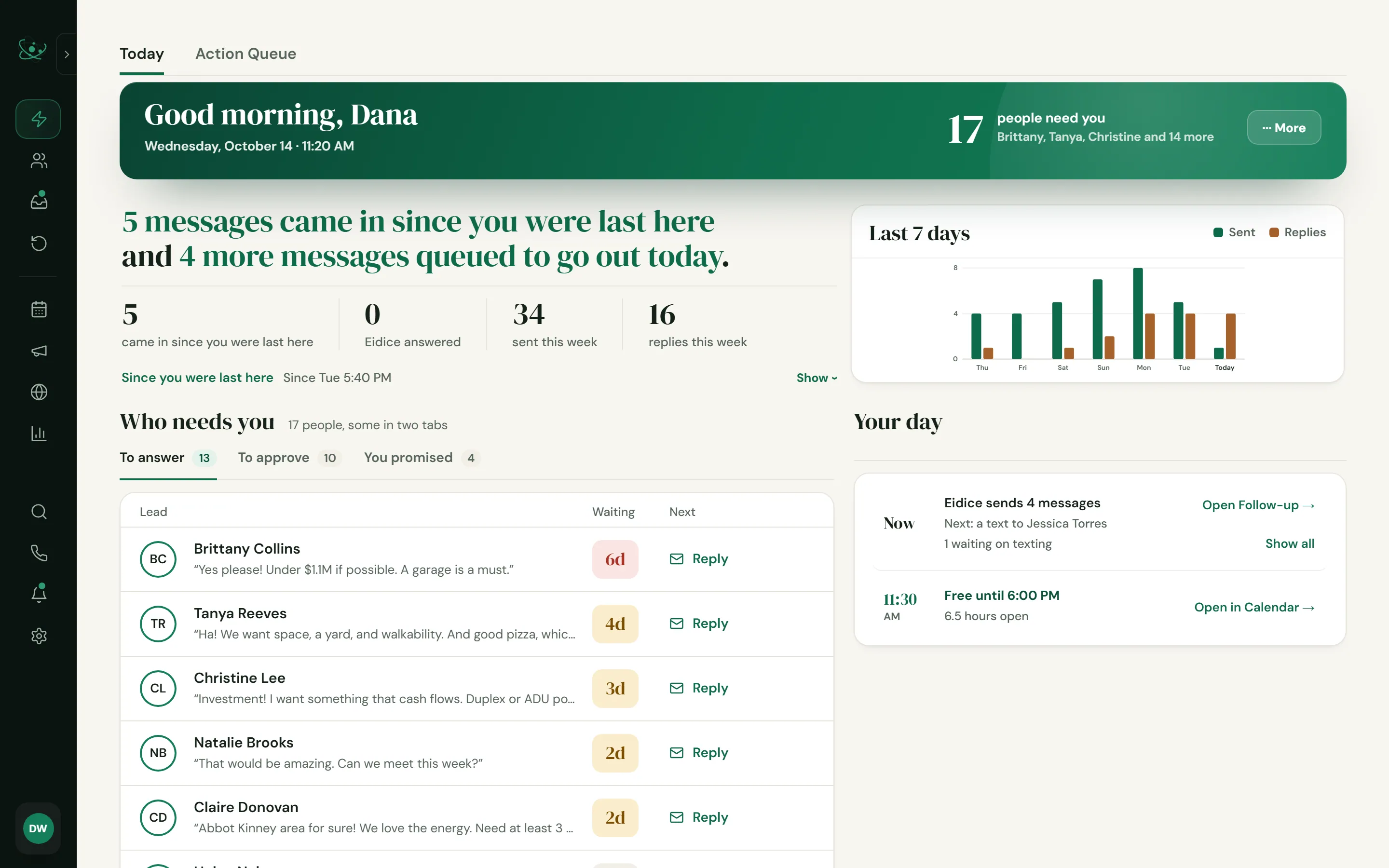
Screens show sample data.
What it connects.
The same integration work we offer companies: email, calendars, texting, payments, industry data and AI, wired into one system.
- GmailReads the inbox and sends replies from the user’s own address.
- Microsoft OutlookThe same for Microsoft 365 mailboxes. Oliver Labs LLC is a Microsoft verified publisher.
- TwilioBusiness texting, registered with US carriers.
- Google CalendarAppointments land on the user’s calendar.
- Licensed dataA live third-party data feed under a signed vendor license.
- StripePlans, checkout and billing.
- ClaudeBring your CRM into Claude and take it from there.
How it gets built.
Think of it as a production line. AI agents do the building, and inspectors at every station decide whether the work moves on. The same system builds your project.
From idea to production, step by step.
Each step has a plain explanation, with the engineering detail one click down.
Plan
Every change starts as a short written brief: what to build, what finished looks like, and which files it may touch. A coordinator agent keeps one queue and hands each brief to the right agent.
Under the hood
Briefs are sized to finish in under about 150 agent steps. Risky work gets a deeper design pass before any code is written, and each working session owns its own files.
Build
AI coding agents write the code. Each one works in its own private copy of the product, so their work stays separate until it is ready to merge.
Under the hood
One git worktree and lane branch per session. Up to 13 agents run at once, and each task goes to the right model: Sonnet for routine work, Opus for security, billing, database and messaging work.
Prove
Every change has to show that it works before it can move on. Every fix leaves a check behind, so a solved problem stays solved.
Under the hood
Unit, behavior, contract, visual (Playwright), integration, security and compliance suites, plus Loop Lab, which runs the real API handlers end to end on the production schema with simulated providers and a virtual clock. A regression corpus runs every night.
Break it
We break the code on purpose to see whether the checks notice. A check only counts if it catches the break, and a change cannot merge until its checks have proven that.
Under the hood
Mutation testing on every new or changed spec: each one ships a mutant, a deliberate fault applied in memory, and its test must fail under it. A missing or surviving mutant fails a required check.
Review
Sensitive work gets a second look from our strongest AI model, separate from the agent that wrote it.
Under the hood
An independent Opus review for each security, billing, database or messaging workstream, by a reviewer agent built to report only verified, high-confidence findings.
Inspect
Before anything merges, an inspection runs across the whole product: privacy and consent, texting law, advertising rules, licensed-data rules, sign-in security and AI cost limits. Changes then wait in line and are checked again on top of the newest code.
Under the hood
Required status checks: ESLint on changed files, mutation proof, preflight --product (the production gates of the preflight suite) and contract proof. A GitHub merge queue runs the product and contract gates on the merged result, and every pull request states what changed for customers.
Release
Releases go out on purpose, never by accident. Database changes go live first, and every release ships with a written note for customers.
Under the hood
Production builds only from commits marked [deploy]. A deploy-before-migration gate refuses code whose database changes are not live yet, and a release-note check makes every release carry customer-facing copy.
Watch
After every release, a robot account signs in to the live product and uses it the way a customer would, reporting anything that breaks. Other robots check every hour that each scheduled job is still running.
Under the hood
A send-suppressed robot tenant drives production after each deploy and daily, fenced off from send and billing routes. An hourly watchdog covers the scheduled jobs, daily checks confirm the live database matches the code and public access stays limited to public data, and the regression corpus runs nightly with push alerts.
The rules every agent works under.
Automatic rules sit between the agents and anything that could go wrong. Most are hard stops: the agent cannot take the action at all.
Overlaps get flagged
Each working session has its own copy of the code. If two sessions touch the same file, both are told before the work collides.
The design agent cannot ship
The agent that drafts new screens is blocked from server code, database changes, tests and shipping, so design moves fast and nothing skips the line.
A cap on the crew
At most 3 of our strongest agents and 10 fast ones run at once, and every agent has to be assigned its model.
A budget on every task
An agent is told to wrap up at 120 steps and is stopped at 150, so no task runs away with time or cost.
Protected production data
Bulk writes to licensed live data are refused outright.
Decisions stay on the record
Past decisions and lessons are kept word for word and loaded into every session, so long work never drifts from what was agreed.
Under the hood
Each rule is a hook wired into every agent session. The hard stops run before a tool call and can refuse it.
Safety built into the product.
The same discipline goes into what Awnitboss does on its own, most of all in the messages it sends.
Every send is checked first
Before anything sends, Awnitboss checks opt-outs on every channel, suppressions, unsubscribes and STOP replies. A message goes out only when every check comes back clear.
It acts on the agent’s terms
Awnitboss answers on its own once the agent turns that on, and anything outside those terms goes to the agent.
A second compliance check
Messages Awnitboss writes on its own get a second compliance review by a separate model, after the rule-based scan.
One switch pauses everything
A platform-wide pause stops every automatic message at once, and every user has a Stop everything button of their own.
Audits on top of the checks.
Checks catch what they were written to catch. Audits look for everything else, and every finding is checked against the real code before anything changes.
- Compliance auditsSpecialist auditors check the product against TCPA, CAN-SPAM, CCPA, auto-renewal law and the advertising rules of its industry.
- Terms against codeEvery sentence of our Terms of Service is checked against what the shipping code actually does.
- Whole-product reviewA read-only review across the whole product: access control, database security, billing, messaging, reliability, AI, accessibility and data lifecycle.
- Click-through auditsAgents click through every screen the way a customer would. One audit walked all 35 admin views live.
- Adversarial auditsA second agent tries to disprove each finding. Only the findings that survive get fixed.
- Customer-persona criticsCritics, each playing a customer with one job, use the product side by side.
- Design critiqueEvery new screen gets an independent design critique before it ships.
- Competitive teardownsWe walk competing products end to end and rank what is worth building.
- Cost auditsWe measure what each AI call and each cloud build costs, and cap it in code.
- Daily screen checksEvery day, a robot opens the product’s screens and checks they stay compliant.
Under the hood
Seven of them run automatically, on every change or every day.
Bring this to your business.
It starts with a free first call about how your business works today.